
XBerts' white-labelled client console allows you to easily collaborate with your clients, while uncovering risks, insights for onboarding clients, advisory, billing and so much more.
Client Portal
XBerts' white-labelled client console allows you to easily collaborate with your clients, while uncovering risks, insights for onboarding clients, advisory, billing and so much more.
The result: proactive client relationships and referrals from clients who understand risks before they arise.



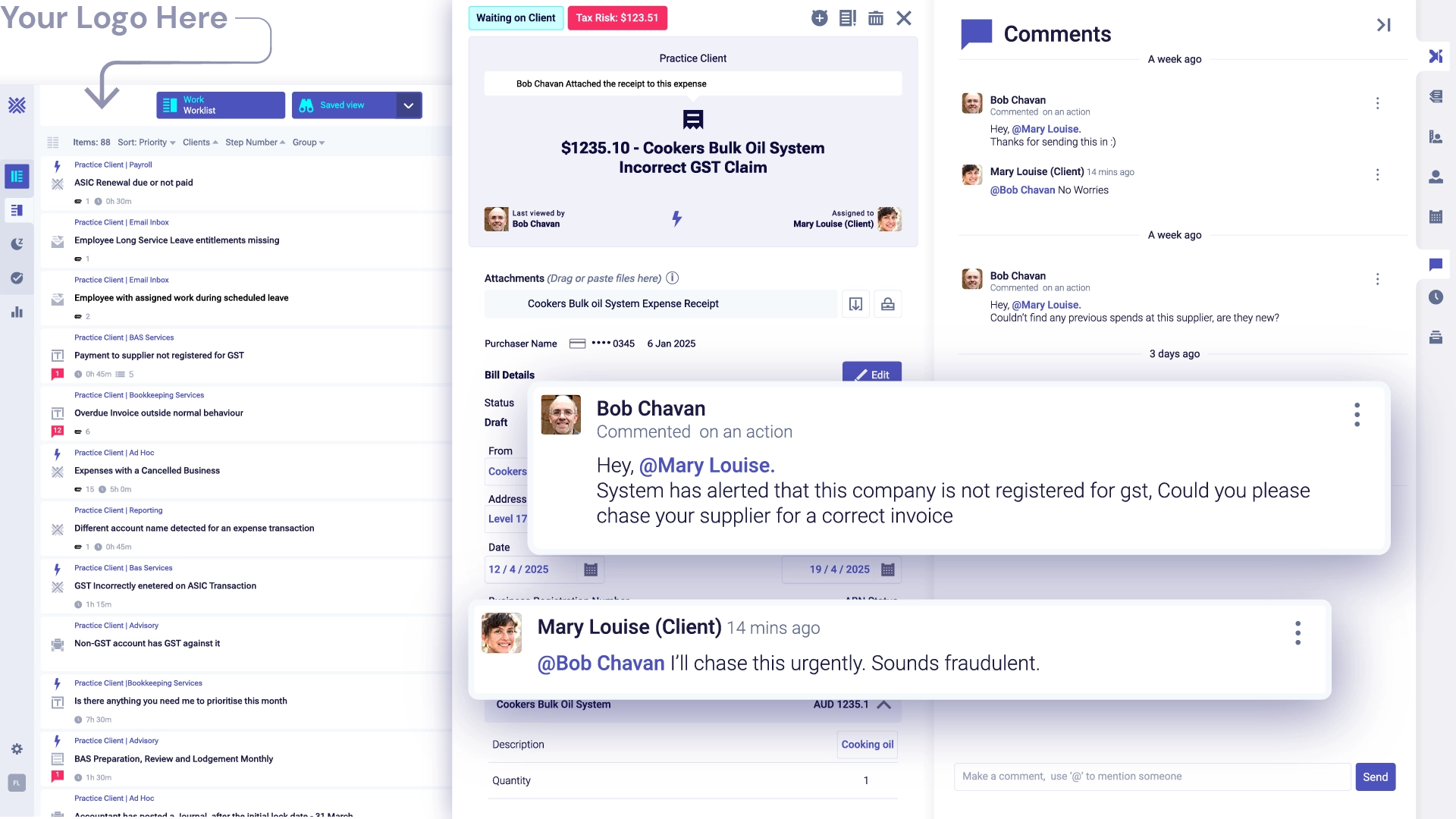
Clients will be forever grateful when you find issues that could cost them their business - and you’ll be grateful for the time (and sanity) saved if you’re inheriting ‘less than professional’ books.
XBerts surface patterns and anomalies automatically - so finance teams arrive at meetings with insights, not excuses. Catch potential fraud, unusual payments, or suspicious activity early, before it becomes a costly problem. Here are a few ways to instantly add value for your clients.

Our data quality report is a great time saver to uncover the size and complexity, as well as what needs immediate clean up. Share it and other reports with your clients for instant rockstar value, and justify clean-up work.
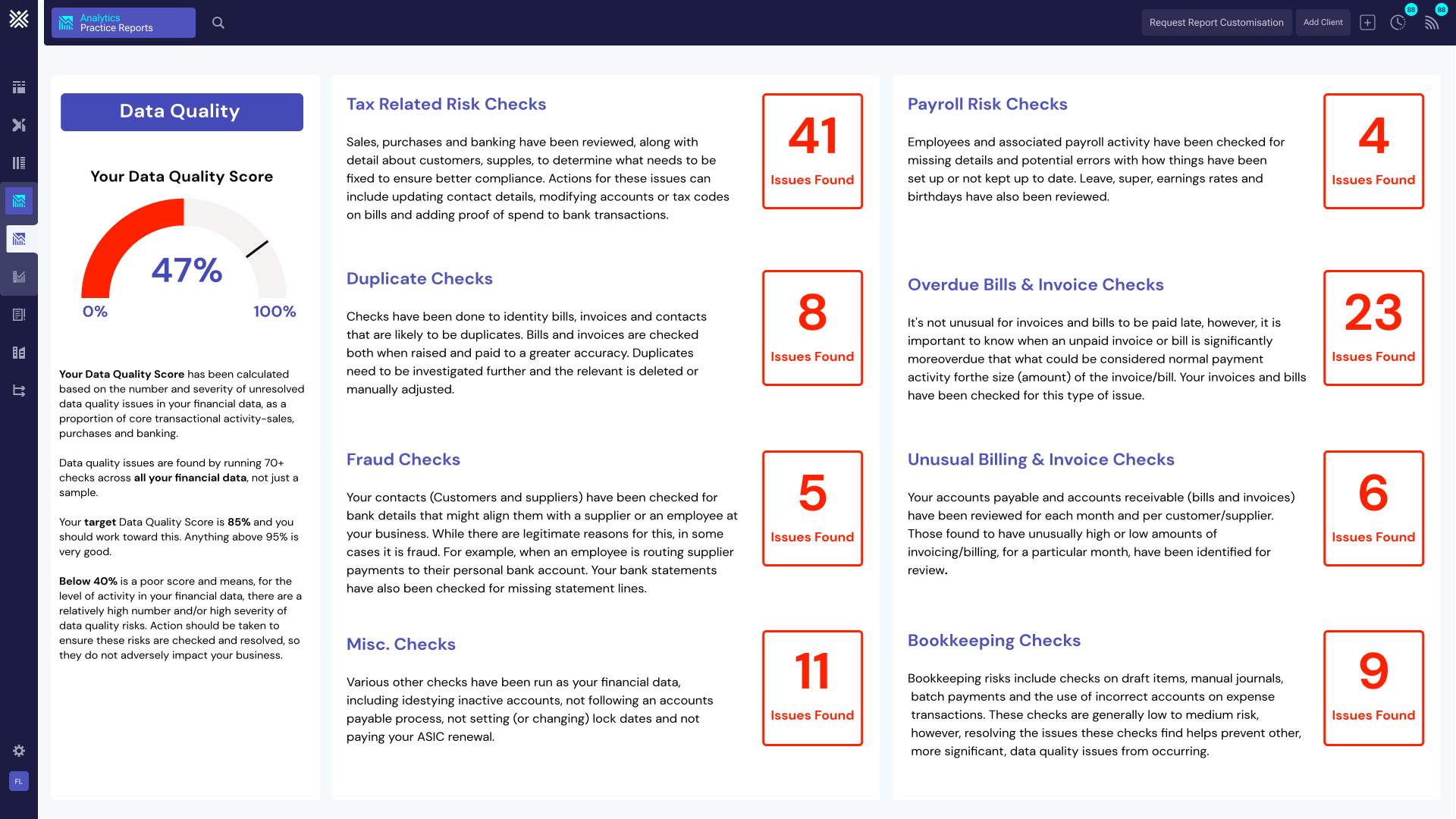
There is no setup required. Connect your client files during sign-up and invite them in.
Alerts will appear on your work boards and you can choose to auto assign the XBerts to your clients in their Portal.
Collaborate with your clients and start getting answers faster.
What is XBert's client portal?
XBert's client portal is a white-labelled, secure client hub that allows bookkeepers and accountants to collaborate with their clients directly — without email chains, shared spreadsheets, or context-switching between systems. Clients can view tasks, reply to queries, attach files, review AI-generated alerts about their own books, and access shared reports — all in one branded, organised space. The result is proactive client relationships and referrals from clients who understand risks before they arise. As Pamela Taylor of Greenspace describes it: 'That's led to a lot of referrals — clients saying we've got a really engaged bookkeeper, someone who brings problems to us before they become problems.'
Is XBert's client portal white-labelled?
Yes. Your Firm Logo appears in the header of the portal reinforcing your identity as a professional, technology-forward practice. This is important for firms that want to deliver a premium client experience without XBert's branding appearing in client-facing interactions. The white-labelled portal is included as part of XBert's platform — no separate licence or add-on required, just your connected file plan is required.
What can clients do inside the XBert client portal?
Clients can: view and respond to tasks assigned to them directly from their bookkeeper or accountant's workflow board; attach files and documents to specific tasks, keeping all correspondence organised and audit-trailed; review AI-generated data quality alerts about their own books; access shared reports including the Financial Overview, Data Quality Report, GST/VAT BAS-related transactions, Summary of Tax Amounts by Type, and Client Queries; and communicate with their practice in a single, organised space — keeping everything out of email inboxes on both sides.
How does XBert's client portal reduce time spent on client communication?
XBert eliminates the main sources of communication overhead in client management: chasing document attachments, following up on outstanding queries, and manually triaging client emails. Schedule client request templates auto-assign to client portals so recurring information requests go out automatically without manual effort. Clients reply and attach files directly on tasks inside the portal, keeping everything organised and creating a clean audit trail. Every task is deep-linked back to the source in the accounting file, so there's no ambiguity about what's needed or why. Sue Dowling, a bookkeeper using XBert, describes finding a $20k plus GST issue between related entities that was solved quickly and seamlessly — precisely because issues were flagged and visible the moment they occurred.
What reports can I share with clients through the XBert portal?
XBert provides a suite of shareable reports that open meaningful advisory conversations and justify your fees. The Financial Overview gives an interactive single-page summary of the business. The Data Quality Report shows the results of XBert's daily automated checks across the client's accounting data — useful both for onboarding new clients and for demonstrating ongoing value at fee reviews. The Summary of Tax Amounts by Type is useful for BAS preparation reviews. Client Queries shows and exports the transactions needing client input to complete bookkeeping. The GST/VAT BAS-related transaction report drills into every key BAS transaction per tax type, by contact, source, and GL account. Sharing these reports turns data quality into proof of value — and proof of value into referrals and renewals.
How does the XBert client portal help with onboarding new clients?
When onboarding a new client, XBert's data quality report provides an immediate, deep insight into the health of their existing file — surfacing errors, inconsistencies, and compliance risks before you commit to a fixed fee. This allows you to quote based on the actual complexity of the work rather than a surface-level assessment, avoiding the trap of underquoting on a messy file. The portal then becomes the ongoing collaboration hub from day one, giving new clients a professional, branded experience from their first interaction with your firm.
Can XBert detect unusual activity and share it directly with clients?
Yes. XBert automatically surfaces patterns and anomalies so finance teams arrive at client meetings with insights, not just numbers. Unusual activity alerts — payment anomalies from customers and suppliers, potential inbound fraud via another party's business registration, late payment risks when a debtor appears to be in trouble, bank account detail changes, and incomplete or inconsistent coding — can all be shared directly with clients through the portal. Clients who are shown these alerts proactively experience a fundamentally different service from what they're used to — one where their bookkeeper or accountant catches problems before they cost the business money.
Does XBert's browser extension work with the client portal?
Yes. XBert's browser extension lets you create a task from anywhere on the web — including directly from within a client's Xero, QuickBooks, MYOB, or FreeAgent file. If a client or staff member makes an error, you can use the browser extension to instantly create a task, add instructions for how it should be fixed, ask why it happened, and assign it — and it appears simultaneously in your team's workflow board and in the client portal, with a direct deep-link back to the specific issue in the accounting file. This means no context is lost, no separate email is needed, and resolution is faster for everyone.
How does the XBert client portal help justify fees and billing?
The XBert client portal gives bookkeepers and accountants the evidence layer they need to charge what their work is actually worth. Data Quality Reports show clients exactly what XBert has been monitoring, catching, and resolving on their behalf — making the value of your service visible and tangible rather than invisible and assumed. When clients can see the volume and complexity of issues being identified and resolved, fee increase conversations become significantly easier. Clients will be forever grateful when you find issues that could cost them their business — and that gratitude translates into renewals, expanded scope, and referrals.
Is there any setup required to start using the XBert client portal?
No. There is no setup required. Connect your client files during sign-up and invite clients in. Alerts appear on your work boards immediately and you can choose which XBerts to auto-assign to clients in their portal. Schedule client request templates can be configured to auto-assign recurring tasks to client portals without manual intervention each time. XBert's Fast Track onboarding programme includes portal configuration guidance — ensuring your team and your clients are set up for a seamless experience from day one.