XBert monitors your business's financial data entry around the clock - catching errors you or your bookkeeper might miss, flagging unusual activity, and giving you confidence that your books are accurate.
XBert for Business Owners
XBert monitors your business's financial data entry around the clock - catching errors you or your bookkeeper might miss, flagging unusual activity, and giving you confidence that your books are accurate.
Because knowing your reports are accurate shouldn't require a qualification. Ask your Bookkeeper if they are using XBert today.


Connect your Accounting file today and discuss with your advisor.
What does XBert do for business owners?
XBert monitors your business's financial data entry around the clock — catching errors you or your bookkeeper might miss, flagging unusual activity, and giving you confidence that your books are accurate before you read your reports. Knowing your financial reports are accurate should not require an accounting qualification. XBert's AI engine runs continuously in the background, checking every transaction, every reconciliation, and every entry in your accounting file — so you can trust the numbers without having to understand them all yourself.
How can I tell if my bookkeeper is doing a good job?
XBert gives you an independent, objective view of your books' health through a Data Health Score — a simple, clear rating that shows the current accuracy of your financial data without requiring any accounting knowledge to interpret. If your bookkeeper is using XBert, you can see the health of your file at any time through the XBert Client Portal. If errors or anomalies are being caught and resolved quickly, your score stays high. If issues are building up unresolved, you'll see it. It's the clearest, most honest picture of what's actually happening in your books. Ask your bookkeeper if they are using XBert today.
What kinds of errors can XBert catch in my business accounts?
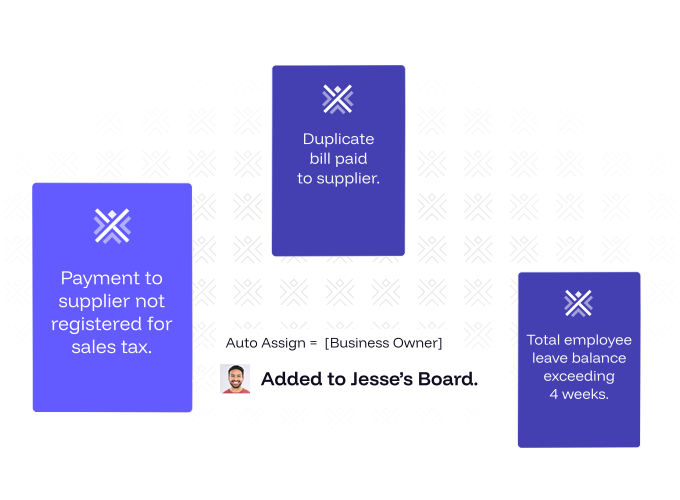
XBert catches the kinds of errors that are easy to miss but expensive to ignore: duplicate payments to the same supplier, GST that has been incorrectly coded or claimed, bank accounts that haven't been reconciled and could be hiding missing transactions, supplier ABN issues that could put your tax compliance at risk, unusual payment patterns that could indicate fraud or data entry mistakes, and transactions that are inconsistently coded — leading to reports that don't accurately reflect your business. Sue Dowling, a bookkeeper who uses XBert, describes the stakes clearly: 'If you miss out on a whole bank account, that could be $20,000 missing off the P&L. XBert is like a second person checking everything.'
Can XBert detect fraud or unusual activity in my business accounts?
Yes. XBert includes automatic fraud and anomaly detection that runs continuously across your accounting data. It flags when a supplier's bank account details change unexpectedly (a common sign of payment redirection fraud), when an employee and supplier share the same bank account, when payment patterns from a customer or supplier behave unusually, when invoices or bills appear to be associated with fraudulent business registrations, and when bank statement lines are missing — which can be a fraud trail. These alerts fire the moment an anomaly is detected, giving you and your bookkeeper the opportunity to investigate before money is lost.
What is XBert's Data Health Score and what does it tell me?
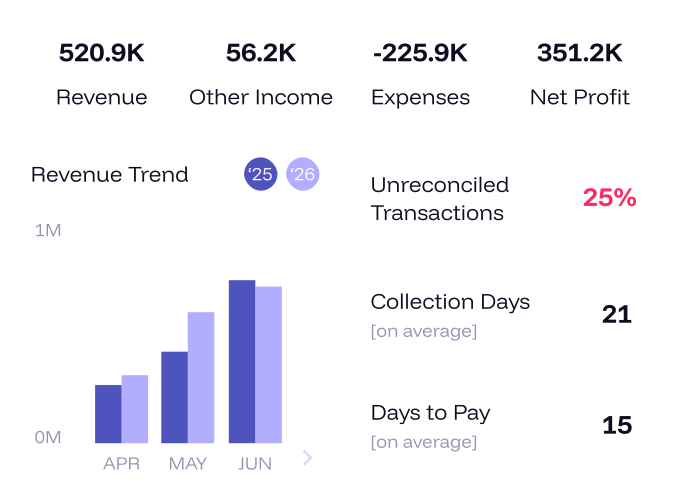
XBert's Data Health Score is a real-time, automatically calculated quality rating for your business's accounting file. It gives you a simple, clear picture of your books' accuracy — updated continuously as XBert's AI checks run. A high score means your financial data is clean, reconciled, and compliant. A lower score means there are outstanding issues that need attention. You don't need any accounting knowledge to interpret it. Pierre Dixon of Profit Hunters describes what it makes possible: 'Using XBert immediately improves timeliness and confidence in the quality of the data, and that allows me to go back to the client and have meaningful discussions regarding the performance of the business.' When the numbers are trustworthy, the conversations they enable are more valuable.
How does XBert help me work better with my bookkeeper?
XBert includes a Client Portal — a shared space where your bookkeeper can send you tasks, share reports, ask questions, and flag items that need your attention, all in one organised place. Instead of chasing information via email and hoping nothing gets missed, the portal gives both sides a clear, shared view of what's outstanding and what's been resolved. You can respond to queries, upload documents, and review the status of your accounts without needing to log in to your accounting software directly. It creates more productive, focused conversations about your finances — because both you and your bookkeeper are working from the same current picture.
Does XBert work with my existing accounting software?
Yes. XBert connects directly to the most widely used accounting platforms: Xero, QuickBooks Online, MYOB, and FreeAgent. Once connected, XBert begins monitoring your data immediately — no manual setup, no CSV imports, no separate data entry. The connection is live and continuous, which means XBert always has access to the most current version of your financial data. Your bookkeeper manages the connection and configuration; you simply gain access to the visibility and assurance it provides.
Do I need accounting knowledge to use XBert?
No. XBert is designed so that business owners can understand the health of their financial data without needing accounting expertise. The Data Health Score gives you a simple, clear read on accuracy. The Client Portal shows outstanding items and reports in plain language. Alerts are written to be understandable, not technical. Your bookkeeper manages the underlying checks and workflow — you receive the outputs in a form you can act on. The goal is confidence in your numbers, not a requirement to become your own accountant.
How does XBert protect my business from GST or VAT errors and compliance risks?
XBert runs continuous GST compliance checks on every transaction in your accounting file. It checks that GST has been applied correctly on every purchase and sale, flags suppliers whose GST registration has been cancelled or suspended (so you are not claiming tax credits you are not entitled to), identifies transactions where GST has been miscoded, and alerts you to bills associated with cancelled or fraudulent business registrations. These issues — if undetected — can result in an incorrect BAS lodgement, ATO penalties, or money paid and lost permanently. XBert's checks run every day, not just at BAS time, so problems are caught and corrected before they compound.
How do I get my bookkeeper to start using XBert?
The simplest step is to ask your bookkeeper whether they are using XBert. If they are not, you can point them to xbert.io or ask them to start a free trial — which requires no credit card and takes minutes to begin. Once your bookkeeper connects your accounting file during sign-up, XBert begins monitoring immediately. You will then have access to your Data Health Score and the Client Portal, giving you ongoing visibility into the accuracy of your books. For business owners who use XBert through their bookkeeper, the platform is entirely managed by the practice — you simply benefit from the visibility and assurance it provides.