


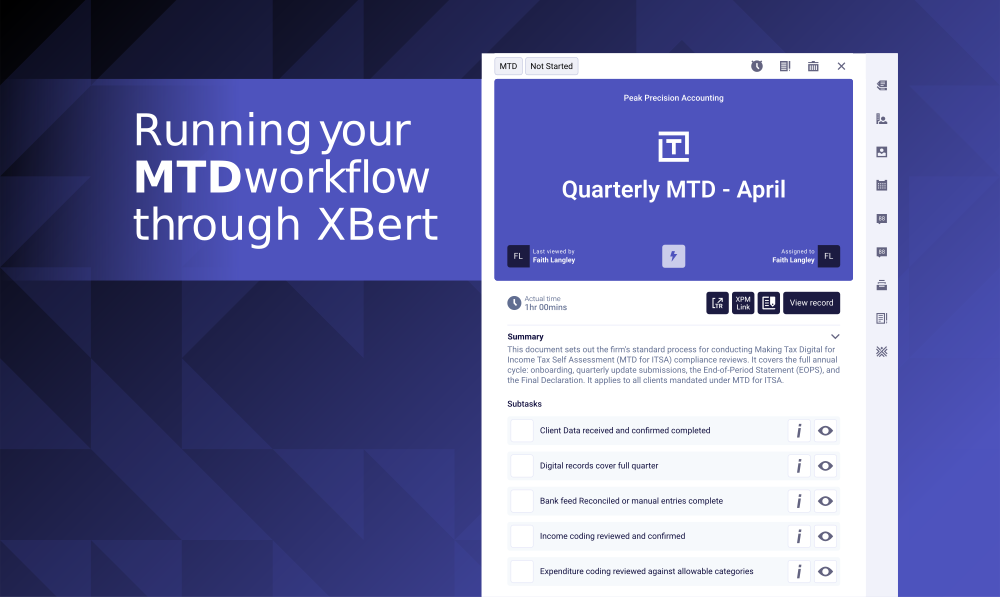

How to Run a Smarter MTD Workflow Through XBert
Build a consistent, team-wide MTD process in XBert so quarterly deadlines stop being a scramble.
MTD is a new service line for your practice. That means new workflows, new deadlines, and new pressure on a team that is already running at capacity.
The firms that will handle this well are not the ones working harder. They are the ones that have built a repeatable, automated process so that nothing is being missed quarter after quarter. That is exactly what this session covers.
XBert UK General Manager Will Rush ran a practical walkthrough on how to build your MTD workflow inside XBert, manage team capacity across quarterly deadlines, and use AI-driven alerts to catch data issues before they become an HMRC problem.
You can watch the full replay here.
The Problem Every Practice Is Facing Right Now
Most firms have not locked down their MTD process yet. That is not a criticism. It is a brand new service line and there is no one-size-fits-all playbook.
What tends to happen without a structured approach is that each team member manages it differently. Some follow an informal checklist. Others wing it. When quarter-end arrives, it becomes a scramble to work out who has done what and whether anything has slipped through.
"It is a brand new thing and a brand new service line that you are going to be offering. So it is all going to be new."
The risk compounds quickly. Data errors that are not caught early become compliance problems. Clients who were not ready for MTD create last-minute corrections. And if your team has no visibility over how many MTD jobs are landing in any given quarter, capacity becomes a real constraint on growth.
XBert Workflow Automation is built to solve exactly this.
Start With the Right Templates
The foundation of a clean MTD process inside XBert is your templates. Templates are where you define the steps, assign roles, and set the recurring schedule so jobs create themselves without any manual intervention.
For MTD, Will recommends building three distinct templates: one for client setup and onboarding, one for the quarterly filing process, and one for end-of-period submissions. Each serves a different purpose and has a different cadence.
"We have gone from setup. So initially, how do we onboard that client into our practice that is going to be impacted, whether they are an existing customer or a new inquiry or a new client coming to you. And how do we get them ready and set up for MTD."
Inside each template you can add as much or as little detail as you need. Steps can include rich text descriptions, links to Scribe documentation or process guides, and additional notes. If you want your team to follow a specific process for a specific client type, that context lives inside the template itself.
You can also mark steps as not required for individual clients, so one template can cover landlords, sole traders, and individuals without needing to create a separate workflow for each.
Set Recurring Schedules So Nothing Is Missed
Once your template is built, you connect it to a schedule. This is where XBert takes the admin off your plate entirely.
For a quarterly MTD filing, you set the start date, the recurrence frequency, and the due date. From that point, XBert automatically creates the job for every assigned client on the correct schedule, with no manual triggering required.
"This job is going to start on the fifth of July and it is going to recur quarterly. There is no end date to it until I say it should stop."
You can also create jobs up to 12 months in advance. This is particularly useful for MTD because it lets you see your full workload pipeline before the pressure of quarter-end hits. You know exactly how many MTD jobs are coming, when they are due, and who they are assigned to.
XBert Workflow Automation handles all of this automatically once the schedule is configured.
Manage Team Capacity Before It Becomes a Bottleneck
Capacity is the silent constraint most practices are not measuring properly. You take on new MTD clients, the quarterly jobs stack up, and suddenly two or three team members are overloaded while others have headroom.
The team overview inside XBert gives you a real-time picture of what every person has assigned, what is overdue, and what is still remaining for any date range you choose. You can filter it to MTD jobs only and see exactly how the workload is distributed.
"You can see in here for MTD we have got two jobs remaining for each person. So maybe we need to give these people some more work. They have not got many jobs."
This visibility matters when you are scaling. Progressive firms use this view to make confident decisions about how many MTD clients they can take on without overstretching the team. You are not flying blind on capacity. You have the data in front of you.
XBert Analytics and Reporting sits alongside this, giving you a practice-level view of data health, transaction volumes, and job completion rates across your entire client base.
Use Smart Notes to Handle Client-Specific Exceptions
No two clients are identical. One might require additional steps for rental income. Another might have a specific bank feed setup that needs a different reconciliation approach. Creating a separate template for every variation is not scalable.
XBert handles this through smart notes. You tag a note to a client with a relevant label, and when that recurring job is created for that client, the note surfaces automatically on the task. Your team see exactly what they need to know before they start.
"The notes are connected to the individual client. So when that job recurs for that client, the note that is specific to that client will show on that job. So your team know what process to follow for each individual client."
This means one clean template, consistently applied, with client-specific context baked in. You can also tag notes to individual subtasks, so the right information appears at exactly the right step in the process.
Catch Data Errors Before They Become Compliance Problems
Workflows keep your process consistent. But XBert's AI audit layer is what keeps your data clean.
As soon as a client is connected, XBert starts scanning their ledger data and flagging anomalies. New supplier duplicates, large VAT activity without a VAT number, invoices sitting in draft, inactive accounts being used. These are the kinds of errors that surface at the worst possible time if you are not catching them earlier in the process.
"Essentially what XBert is doing is scanning that Xero data and pointing out to you anything that might be wrong within that data and telling you, hey, you need to have a look at this."
Every client gets a data quality score so you can see at a glance where the risk sits. A client at 62% data quality before a quarterly filing is a client that needs attention before you attempt submission.
XBert AI Audit and Data Quality runs continuously in the background, so your team is always working with clean, reliable data rather than discovering problems under deadline pressure.
What Is Coming Next: XBert Agents for MTD
The next step in the XBert product roadmap takes this further. Will gave attendees an early look at XBert Agents, a feature that is rolling out over the coming weeks.
Rather than manually defining every custom alert, you describe your MTD process in plain language instructions. XBert then runs that process automatically, generates the relevant custom XBerts, surfaces exceptions, and prepares a review summary for the manager or partner to sign off.
"You type in here, define your process for MTD. And then XBert will go away and perform all of those checks for you. But not only would it perform all of those checks, it will also generate custom XBerts on top of the ones that we have as standard."
This keeps the human in the loop at the right moment, the review and sign-off stage, while automating all of the data interrogation that sits beneath it. XBert also has a memory layer built in, so it learns from how your team has handled previous reviews and gets smarter over time.
You can watch the full replay here to see the agent demo in full.
Track Time on MTD From the Start
This is a new service line. You do not yet know how long it actually takes. That uncertainty creates pricing risk if you do not get on top of it early.
XBert has built-in time tracking that is easy to switch on even if your firm does not track time as standard practice. You can start a timer directly inside a task or log time manually after the fact.
"With new service lines or new things like MTD, it might be worth just tracking a bit of time just to see where you are at with these specific tasks and how long it is actually taking you. So then you can make sure it is a profitable service for you."
With a few quarters of data behind you, you will know exactly what each MTD submission costs in team time, which puts you in a much stronger position to price the service correctly and identify where the process can be tightened.
Build the Foundation Now, Scale With Confidence Later
MTD is not going away. The volume of clients affected is only going to grow.
The firms that set up their process properly now, with recurring templates, automated schedules, capacity visibility, and AI-driven data checks, are the ones that will be able to scale their MTD client base without a proportional increase in workload.
"What we want to be able to give you is the ability to tailor XBert to how you want to work and what you want to see in the platform. And making sure that you have got things set up from the start is really pretty important."
The replay from this session walks you through every step of the setup process, from building your first MTD template to running a full review inside the new Agents feature.
Start your FREE trial and become the go-to firm with the AI tech advantage.

